セットアップ
このセクションでは、Kiro CLI と AWS がホストする Amazon EKS MCP server を設定し、自然言語コマンドを使用して EKS クラスターを操作できるようにします。
完全にマネージドされた Amazon EKS MCP server は AWS によってホストされているため、インストールやメンテナンスが必要なローカルサーバーはありません。Kiro CLI は、軽量なクライアント側プロキシ(mcp-proxy-for-aws)を介して接続し、SigV4 を使用して AWS 認証情報でリクエストに署名します。Amazon EKS MCP server はプレビュー段階であり、変更される可能性があります。
Kiro CLI は、一般的な開発および運用タスクのために生成 AI 機能を活用します。その機能は、特定の知識のために構築された専用の MCP server を追加することで強化できます。このセクションでは、3つのサーバーを設定します: EKS と Kubernetes の操作用のホスト型 Amazon EKS MCP server(eks-mcp)、より広範な AWS リソースアクセス用のホスト型 AWS API MCP server(aws-mcp)、そして AWS ドキュメントを検索するための AWS Documentation MCP server です。AWS が提供する MCP server のカタログはこちらで確認でき、同様の方法で Kiro CLI と組み合わせて使用できます。
まず、お使いのオペレーティングシステムと CPU アーキテクチャ用の Kiro CLI リリースをダウンロードします:
Kiro CLI をインストールします:
インストールを確認します:
kiro-cli 2.10.0
次に、ホスト型 MCP server を使用して Kiro CLI を設定します。使用する設定は次のとおりです:
{
  "mcpServers": {
    "eks-mcp": {
      "disabled": false,
      "type": "stdio",
      "command": "uvx",
      "args": [
        "mcp-proxy-for-aws@1.6.4",
        "https://eks-mcp.${AWS_REGION}.api.aws/mcp",
        "--service",
        "eks-mcp",
        "--region",
        "${AWS_REGION}"
      ]
    },
    "aws-mcp": {
      "disabled": false,
      "timeout": 100000,
      "type": "stdio",
      "command": "uvx",
      "args": [
        "mcp-proxy-for-aws@1.6.4",
        "https://aws-mcp.us-east-1.api.aws/mcp",
        "--metadata",
        "AWS_REGION=${AWS_REGION}"
      ]
    },
    "awslabs.aws-documentation-mcp-server": {
      "disabled": false,
      "type": "stdio",
      "command": "uvx",
      "args": [
        "awslabs.aws-documentation-mcp-server@latest"
      ],
      "env": {
        "FASTMCP_LOG_LEVEL": "ERROR",
        "AWS_DOCUMENTATION_PARTITION": "aws"
      },
      "autoApprove": []
    }
  }
}
eks-mcp と aws-mcp のエントリは、uvx 経由で mcp-proxy-for-aws プロキシを実行し、ホスト型エンドポイント(https://eks-mcp.<region>.api.aws/mcp と https://aws-mcp.<region>.api.aws/mcp)にリクエストを転送し、AWS 認証情報で署名します。${AWS_REGION} プレースホルダーは、以下でファイルを書き込む際にラボのアクティブなリージョンに置き換えられます。
uvx は、uv パッケージマネージャーに付属する Python パッケージランナーツールです。グローバルにインストールすることなく、Python パッケージを直接実行します。その後、Node.js の npx に似た、分離された環境で Python ツールをダウンロードして実行しますが、Python パッケージ用です。
MCP 設定を ~/.kiro/settings/mcp.json に書き込み、リージョンを置き換え、必要な uv/uvx ツールをインストールします:
ホスト型 MCP server は、AWS SigV4 を使用してワークショップ IDE ロールとして認証します。必要な eks-mcp と aws-mcp IAM 権限は IDE ロールに既にプロビジョニングされており、eks-workshop クラスターの API エンドポイントが公開アクセス可能であるため、書き込み(特権)ツールが機能します。aws eks update-kubeconfig や追加の認証情報設定は必要ありません。
Kiro CLI を使用するには、AWS Builder ID または Pro ライセンスサブスクリプションを使用して認証する必要があります。
無料の AWS Builder ID は、これらの手順に従って作成できます。この Builder ID は、Kiro CLI の個人使用にも使用できます。
? Select login method >
> Use with Builder ID
Use with Google
Use with GitHub
Use with Your Organization
希望するログイン方法を選択し、プロンプトに従ってログインします。まだ Kiro アカウントをお持ちでない場合は、Google または GitHub アカウントを使用して無料トライアルアカウントを作成できます。Google または GitHub アカウントをリンクするには、指定された URL を開く必要があります。
Kiro 無料トライアルアカウントでは、最初に 50 の Kiro クレジットが付与されます。このラボでは 5 クレジット未満しか必要としない場合があります。そのため、このワークショップの外でもそのアカウントを使用して、他のプロジェクトで Kiro トライアルを継続できます。kiro-cli セッション内で /usage コマンドを使用して、使用したクレジットを確認できます。Kiro 無料トライアルアカウントを作成するために支払い情報は必要ありません。
セッションを初期化して、MCP server が利用可能であることを確認しましょう:
設定された MCP server が提供するツールを確認するには、次を実行します:
/tools
次のような出力が表示されます:
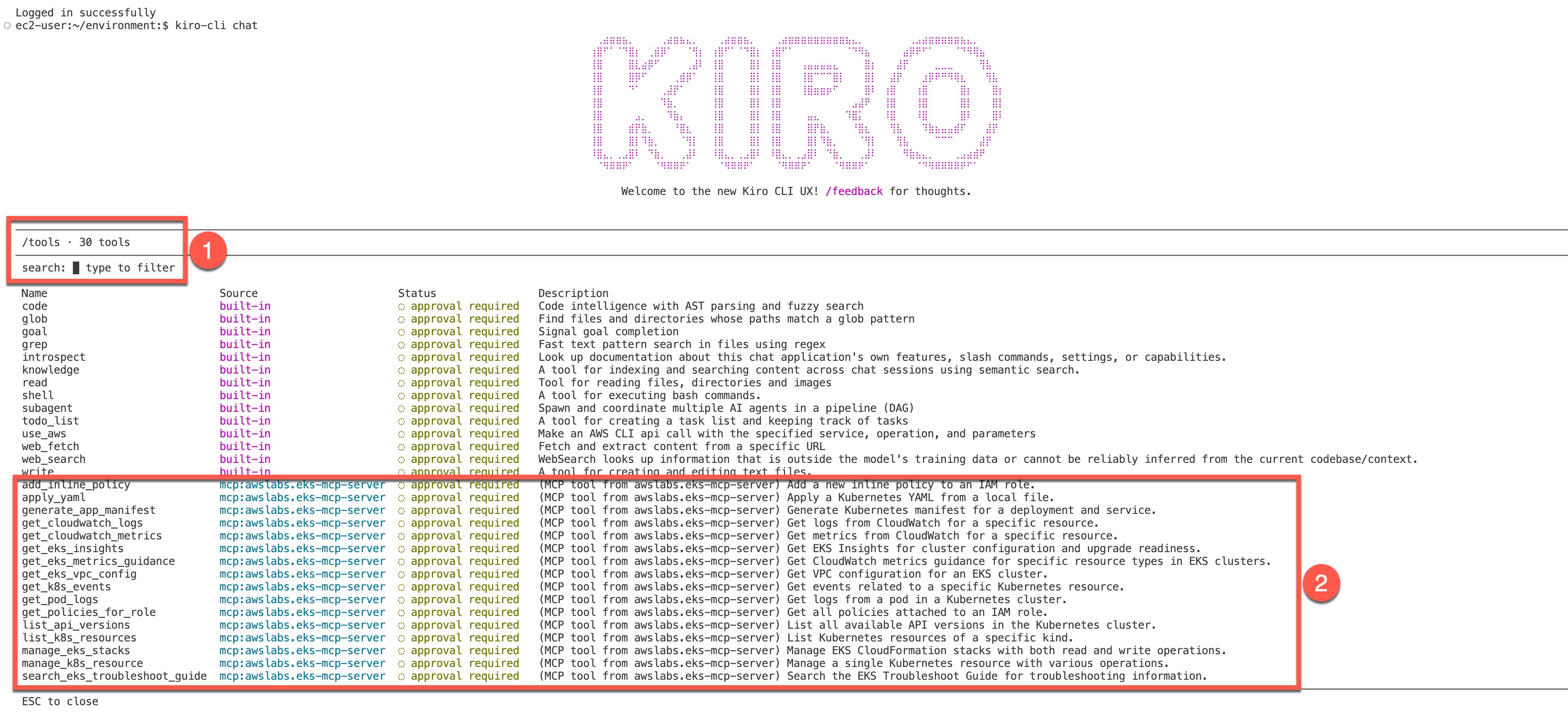
出力には次のものが表示されます:
/toolsのような Kiro コマンドを実行できるスペース。/を入力すると、そのようなコマンドがすべて表示されます。Kiro コマンドの詳細については、こちらをご覧ください。- 設定された MCP server(
eks-mcp、aws-mcp、および AWS Documentation server)が提供するツールのリスト
ツールが approval required とマークされている場合、Kiro CLI はそれを使用する前に許可を求めます。これは特に、リソースを作成、更新、または削除できるツールに対する安全対策です。LLM は間違いを犯す可能性があるため、潜在的に破壊的なアクションが実行される前に、それらを確認する機会が与えられます。
同じ手順に従って、追加機能のために AWS Labs の他の MCP server を追加できます。このラボでは、設定したホスト型 eks-mcp と aws-mcp server、および AWS Documentation server を使用します。
次のセクションでは、Kiro CLI を使用して EKS クラスターに関する情報を取得します。